


Support/Info: S60v3/S60v5-- Signed-Gates
Details:
Gravity is the first fully-featured and native Twitter client for the S60 platform. It supports multiple accounts, Twitter Search, Laconica, Ping.fm, posting of pictures via MobyPicture & TwitPic and wraps everything into a gorgeous looking interface.
Gravity is the first fully-featured and native Twitter client for the S60 platform. It supports multiple accounts, Twitter Search, Laconica, Ping.fm, posting of pictures via MobyPicture & TwitPic and wraps everything into a gorgeous looking interface.
Overview of Gravity’s Features:
· Compatible with Twitter and Laconica
· All functions available on your S60 phone: tweet, reply, retweet, DM, follow & unfollow, block, create favourites, search, auto-update and many more …
· Tabbed view of your Timeline, Replies, Messages, Friends, …
· Profile View to see information about a Twitter User
· Configurable Audio alerts for Timeline/Replies/DM’s & Searches
· Auto-Connect to any Access Point and Auto-Fallback to WLAN
· Setup and use as many accounts as you want at the same time
· Group support for creating custom tabs with user-defined filters
· Post URLs from tweets to del.icio.us or Instapaper
· Twitter-Search section with multiple search tabs and Twitter Trends
· Post pictures to MobyPicture, TwitPic, TwitGoo, Posterous, Yfrog or img.ly
· Preview pictures from MobyPicture, TwitPic, TwitGoo, Flic.kr, Yfrog and img.ly
· Ping.fm support by simply sending “p message†or “p #group messageâ€
· Open URLs from any Tweet
· Kinetic scrolling on S60v5 ( Nokia 5800 and Nokia N97 )
· Theme support ( fixed dark and bright theme )
· Full-Screen mode
· Includes a Homescreen Widget for the Nokia N97
· Built-in auto-update function and beta access for testing the latest features
· All functions available on your S60 phone: tweet, reply, retweet, DM, follow & unfollow, block, create favourites, search, auto-update and many more …
· Tabbed view of your Timeline, Replies, Messages, Friends, …
· Profile View to see information about a Twitter User
· Configurable Audio alerts for Timeline/Replies/DM’s & Searches
· Auto-Connect to any Access Point and Auto-Fallback to WLAN
· Setup and use as many accounts as you want at the same time
· Group support for creating custom tabs with user-defined filters
· Post URLs from tweets to del.icio.us or Instapaper
· Twitter-Search section with multiple search tabs and Twitter Trends
· Post pictures to MobyPicture, TwitPic, TwitGoo, Posterous, Yfrog or img.ly
· Preview pictures from MobyPicture, TwitPic, TwitGoo, Flic.kr, Yfrog and img.ly
· Ping.fm support by simply sending “p message†or “p #group messageâ€
· Open URLs from any Tweet
· Kinetic scrolling on S60v5 ( Nokia 5800 and Nokia N97 )
· Theme support ( fixed dark and bright theme )
· Full-Screen mode
· Includes a Homescreen Widget for the Nokia N97
· Built-in auto-update function and beta access for testing the latest features
CHANGELOG:
Fix minor bugs, more faster open images section
Fix minor bugs, more faster open images section
Support/Info: S60v3/S60v5 -- Signed-Gates
Details:
Gravity is the first fully-featured and native Twitter client for the S60 platform. It supports multiple accounts, Twitter Search, Laconica, Ping.fm, posting of pictures via MobyPicture & TwitPic and wraps everything into a gorgeous looking interface.
Gravity is the first fully-featured and native Twitter client for the S60 platform. It supports multiple accounts, Twitter Search, Laconica, Ping.fm, posting of pictures via MobyPicture & TwitPic and wraps everything into a gorgeous looking interface.
Overview of Gravity’s Features:
· Compatible with Twitter and Laconica
· All functions available on your S60 phone: tweet, reply, retweet, DM, follow & unfollow, block, create favourites, search, auto-update and many more …
· Tabbed view of your Timeline, Replies, Messages, Friends, …
· Profile View to see information about a Twitter User
· Configurable Audio alerts for Timeline/Replies/DM’s & Searches
· Auto-Connect to any Access Point and Auto-Fallback to WLAN
· Setup and use as many accounts as you want at the same time
· Group support for creating custom tabs with user-defined filters
· Post URLs from tweets to del.icio.us or Instapaper
· Twitter-Search section with multiple search tabs and Twitter Trends
· Post pictures to MobyPicture, TwitPic, TwitGoo, Posterous, Yfrog or img.ly
· Preview pictures from MobyPicture, TwitPic, TwitGoo, Flic.kr, Yfrog and img.ly
· Ping.fm support by simply sending “p message†or “p #group messageâ€
· Open URLs from any Tweet
· Kinetic scrolling on S60v5 ( Nokia 5800 and Nokia N97 )
· Theme support ( fixed dark and bright theme )
· Full-Screen mode
· Includes a Homescreen Widget for the Nokia N97
· Built-in auto-update function and beta access for testing the latest features
· All functions available on your S60 phone: tweet, reply, retweet, DM, follow & unfollow, block, create favourites, search, auto-update and many more …
· Tabbed view of your Timeline, Replies, Messages, Friends, …
· Profile View to see information about a Twitter User
· Configurable Audio alerts for Timeline/Replies/DM’s & Searches
· Auto-Connect to any Access Point and Auto-Fallback to WLAN
· Setup and use as many accounts as you want at the same time
· Group support for creating custom tabs with user-defined filters
· Post URLs from tweets to del.icio.us or Instapaper
· Twitter-Search section with multiple search tabs and Twitter Trends
· Post pictures to MobyPicture, TwitPic, TwitGoo, Posterous, Yfrog or img.ly
· Preview pictures from MobyPicture, TwitPic, TwitGoo, Flic.kr, Yfrog and img.ly
· Ping.fm support by simply sending “p message†or “p #group messageâ€
· Open URLs from any Tweet
· Kinetic scrolling on S60v5 ( Nokia 5800 and Nokia N97 )
· Theme support ( fixed dark and bright theme )
· Full-Screen mode
· Includes a Homescreen Widget for the Nokia N97
· Built-in auto-update function and beta access for testing the latest features
CHANGELOG:
Fix minor bugs, more faster open images section
Click below to download
Gravity-1.32.6576-ALL(symbianzone.co.cc).rar
Fix minor bugs, more faster open images section
Click below to download
Gravity-1.32.6576-ALL(symbianzone.co.cc).rar


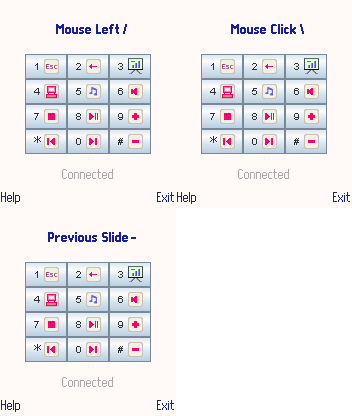
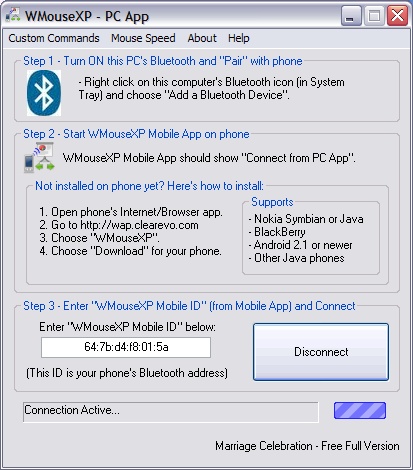
 Change Powerpoint/Presentation slides wirelessly from your mobile phone.
 Smoothly move your computer's mouse pointer from your phone's joystick. No need for laser-pointers pointing at your projector screen.
 Media-Player control: Play, pause, stop, next, previous song/video.
 Computer Volume +, - or MUTE.
 All functions are uniquely integrated into one single command screen - so intuitive and easy that you don't have to look at the phone once you get used to the easy-to-remember command mapping.